Reolink AI Watch Dogs
Six cameras, endless notifications, and a moth the camera swears is my dog. How I'm building a local watcher on a Mac mini—YOLO plus Apple's Foundation Models—to make every camera notification count.
On this page
My Experience
The Setup
I have six Reolink cameras installed at my house. They are all hardwired into a central box, called an NVR (Network Video Recorder), that stores the camera feeds, handles video playback and sends notifications to the Reolink phone app.
The cameras have their own on-board detection system to help identify when there is a Person, Vehicle, Animal (sometimes they also call this a Pet), or any Motion. If any camera detects one of those events and you have that event enabled, it will send a notification to the phone.
The Noise (and the Moths)
A single person walking by multiple cameras sends a notification for each camera. Even if the person stays in view of one camera, the notifications keep coming. The same happens when I let my dogs out in the backyard: notification after notification as they walk around the yard, with no limit on repeats.
Multiple repeat notifications in the same moment usually leads to a heavy-handed fix: turn off certain triggers on a specific camera, or mute all notifications for the phone app for a period of time. With this many repeats during the day, there is no way I’m letting those notifications “buzz” or “chime” on my phone/watch.
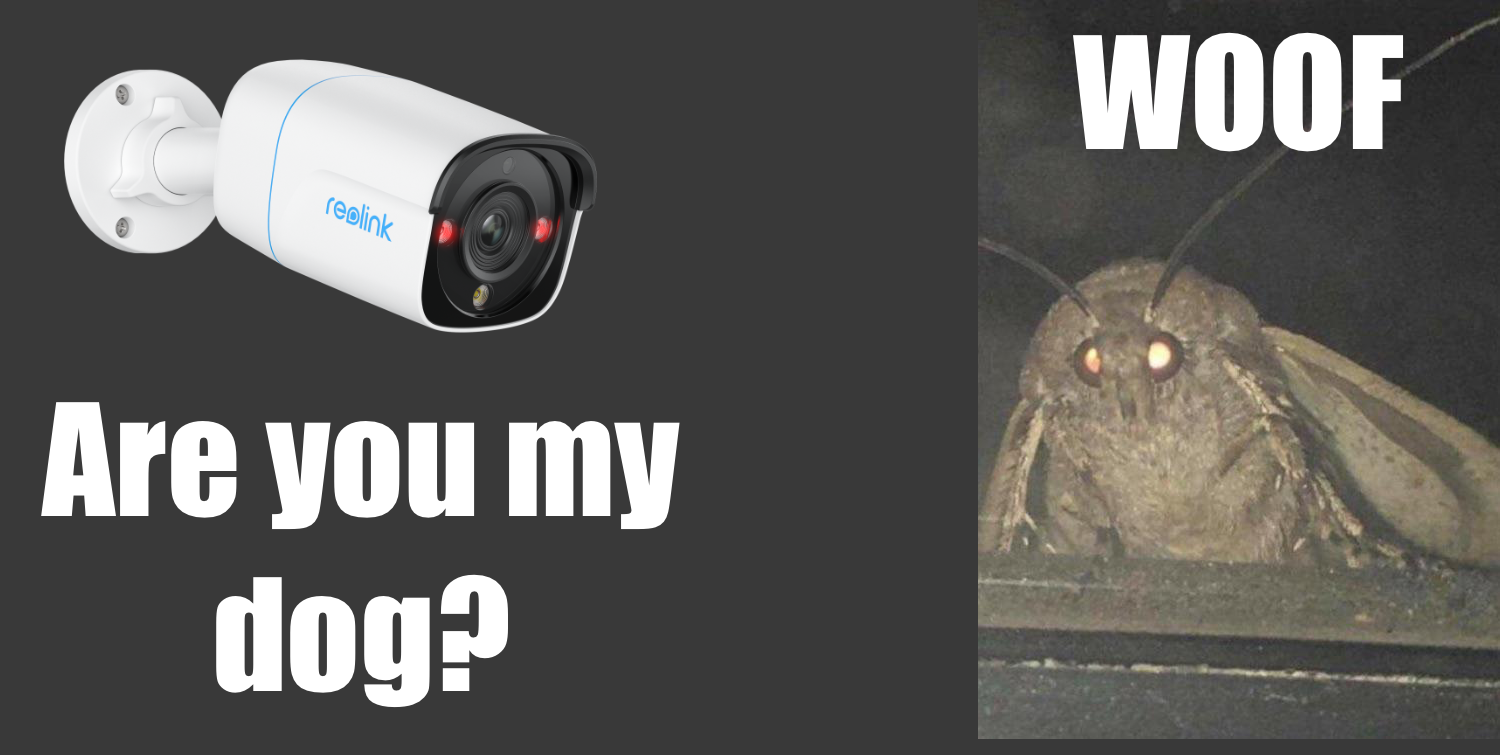
Then there is the misclassification of the triggered events. These usually happen at night with the infrared lights enabled; water droplets swirling around are detected as a person, or more commonly, a bug flying by (usually a moth that found the infrared lamps) becomes an Animal. As far as the camera is concerned, that moth is my dog.
One Size Doesn’t Fit All
I have also found that different types of notifications, depending on the camera location or time of day, should behave differently. I like knowing my pets are outside, but not every time other wildlife wanders through (e.g. turkeys, deer, raccoons). Sometimes these animals can hang out for hours around the same set of cameras, sending repeat triggers the whole time. During the day, I want to know about my pets; at night, only people and vehicles should wake me up.
Another daunting experience is configuring each camera for its location and behavior. These settings are buried inside the app, called different things, spread across sliding calendars/schedules and overlaid with trigger types. Then when you get one camera done, you have to repeat it for the next one.
Why It Matters
While the camera system is doing (mostly) what it advertised, it just isn’t solving my needs: give me a notification that is actionable/helpful. This isn’t just a Reolink problem; it’s true of most camera systems. They either do quick on-device detection or send images to the cloud for identification. Buying newer cameras with upgraded detection helps, but it still doesn’t solve the “a notification worth getting” coordination. It would be really nice if I could trust getting notifications at night while sleeping.
All of this reminds me of being on-call for a 24x7 service:
- get paged at night (for a common blip that has no actionable impact)
- wake up and log into the computer
- acknowledge it (so it stops notifying us)
- go back to sleep
After a few of these non-actionable pages, trust drops and we start ignoring alerts. When a real one comes in, we are slow to respond because it might just be “another common annoying alert”, only to find out too late that our customers are impacted. Annoyance breeds complacency, so this is worth the time to fix properly and quickly.
My personal preference is to keep all object detection local, not on someone else’s cloud, and I don’t feel this responsibility belongs fully on the camera or NVR. Let’s be honest: is a vendor’s solution really going to solve my exact needs? If a vendor can give me the tools to DIY watch for these detections, I can build my own system and try to make every notification count… for me.
In-Seat Observations
After using this system for a while, specific patterns emerge. I have found that triggered video clips under ~12 seconds are almost always unimportant: a moth flies by, the camera says “Animal”, and the clip length is usually 8 seconds. So when scrolling through clips on the Reolink app, I’ve started skipping past the short clips.
I’ve also chased a burst of “Any Motion” triggers only to find a spider web in front of the camera. Webs light up at night under the infrared lights (the spider knows where the lamps are, too), but they’re hard to spot if you only check the live views during the day.
Parked cars cause their own trouble. As the sun moves (and the seasons change), glare and reflections make a car that hasn’t moved look like it just arrived or left.
Lastly, sometimes a camera just goes “out of focus” and only a power-cycle (of that camera or the whole system) fixes it. When this happens, that camera also stops sending triggers. This one worries me, because you don’t know until you check every camera’s live feed by hand.
What I Actually Want
- Stay local: I want my camera feeds to stay on my local network, with no images shipped to a third party, no matter how good that system is advertised.
- Trust the night: I want to trust notifications at night while sleeping: tell me about people or vehicles, but not about wildlife/animals.
- Fewer repeats: If my pets are where they’re allowed, don’t keep telling me. But if they get out through the gate, I want to know if they are seen on other cameras.
- Tell me what needs fixing: Make notifications matter, and tell me when some part of the system needs a fix (power-cycle a camera, add a no-trigger zone, clean a cobweb).
If a system can reliably meet my “wants”, I would turn off the Reolink app’s notifications entirely. Still, Reolink’s recordings are the source of truth, and I would have my notifications point back to its recorded event.
Reality Check
I don’t expect any system to be 100% perfect; there are too many corner cases. I’m sure that closer to June, when the sun has moved, there will be something else to review and adjust.
If a notification is wrong, I want to jump on it right away; recordings on the system don’t last forever. And it shouldn’t feel painful.
One of my base rules when building this service is: “If in doubt, send the notification.” We can always clean this up later. Everything will be logged and we can use this to go back and review the system’s performance. This is where agentic AI tools like Claude Code come in: they can do a deep analysis in seconds to help put the system back on the right path.
I don’t expect (or even want) Reolink to solve this for me. If they keep making cameras that give me reliable triggers and coverage, I would be really happy with that.
Two more realities: my data and my time. In the finished system, no personal data (like camera images) leaves my home network; during development, I do let Claude check detection quality using image snapshots. And getting something running “good enough” early lets me measure what works and what doesn’t, and shows which features are worth my time.
My Approach: Crawl, Walk, Run
Once I knew the Reolink could send events over the network, I knew my own local service could be the gatekeeper for them.
I have a Mac mini I use for personal software projects. I used Claude Code to build the detection pipeline, and I still use it to analyze the logs and tune out misfires.
To keep images local, I started with a Mac app I’d built earlier: an API server for the Apple Foundation Models framework. It was also a good test of the enhanced on-device models delivered in macOS 27. (I found that the macOS 26 version of the framework was really limiting. macOS 27 still has limits, but I think it is now good enough for a decent prototype.)
For sending notifications, I’m using a free service (I may move to a one-time-cost one, since I’ve seen delayed or missing alerts). With some of my future “wants”, I’ll probably build my own mobile app, allowing me to have more filtering controls. For now, logging everything and keeping the rest simple lets me test the idea itself, not the side pieces that aren’t the core problem.
Right now, I’m in the walking stage. Most of the system’s behavior lives in settings in a local database. It’s probably tied too closely to my own camera setup, but whenever a fix proves itself, I try to turn it into something reusable.
For example, my Front Porch and Garage Eye cameras both see the front of the house, so one person walking up sent me two notifications. The local fix was to hard-code “treat these two cameras as one.” Once real data showed that worked, I made it generic: each camera gets a role (like “front”), and cameras that share a role count as one area.
Where Walking Stands: The Daily Summary
Below is the summary I run often to check how the system is doing.
The number I watch most: notifications saved overnight, compared with what Reolink would have sent.
Reolink watch · Wed 9:15 am (last 9 h)

REOLINK (its AI triggers)
  Triggers (75): people (6), vehicles (9), animals (60); repeats (25)

SENT TO YOUR PHONE (8)
  people (1), vehicles (4), animals (3)
    7:02 am Garage Hill: cat
    7:03 am Front Porch: cat
    7:35 am Garage Eye: vehicle left
    7:37 am Front Porch: vehicle left
    8:17 am Rear Slider: cat
    8:27 am Garage Eye: new vehicle
    …and 2 more

WATCHER (checked each trigger)
  Confirmed (29): people (3), vehicles (4), animals (22)
  Held (23): our pets (11), same happening, other camera (5), rate limit (4), night (3)
    coyote (1) 12:15 am Garage Eye, night
    fox (2) 12:55 am–12:56 am Garage Eye, Garage Hill, night
    dog (11) 8:14 am–8:26 am Back Patio, Rear Slider, our pets
  Skipped (21):
    vehicles (1): camera was tracking (1)
    animals (20): deer (19), unsure (1)

CHECK IN THE REOLINK APP (1): Reolink and the watcher disagree
    6:18 am Garage Hill: Reolink "animal", watcher: unsure, saw coyote + deer
    https://reolink.com/ulink/alarm?...

CAMERAS
  Garage Gate (fine): no AI triggers, but (150) motion events: the camera is
    working. Fine if nothing passes there; otherwise check its AI detection
    settings (zones, object size)
  Garage Hill (fine): at night (21) triggers, 21.0× usual (~1): it was
    foggy/misty (droplets glow in the infrared). If it happens on clear
    nights too, look for a spider web or dirt on the lens

SYSTEM
  ok

PERFORMANCE
  Reolink flagged (50) events; the watcher notified you about (6), plus (2) the watcher found
  Saved you from (44) notifications (88% savings)
  Overnight (11 pm–6 am): Reolink flagged (3), the watcher notified you about (0). Saved you from (3) (100%)
  Watcher found (2) that Reolink didn't flag (cars leaving)

NEEDS ATTENTION
  - (1) to check in the Reolink app (see above)
What I Have Discovered So Far
- Reolink NVR is a good first hint (“found something”), not the final answer.
- The Watcher’s detection of a person or animal has been very reliable.
- Vehicle alerts are getting reliable.
- Vehicles can stay for a long time in one place.
- Pan/tilt cameras make vehicle detection harder.
- Glare shifts with the sun and the seasons, and shows up as false positives (especially for vehicles).
- A car departing is harder to detect than one arriving; it’s often half out of frame.
- Pre-cropping the image before sending it to Apple’s Foundation Models framework made it much more accurate.
- I use YOLO (“You Only Look Once”), a local object-detection model, to crop to everyday objects (person, car, truck, dog, cat, bird, etc.).
- Infrared/night time is a bit tougher for YOLO, but the Apple Foundation Models framework gets the final say. As Apple improves their models, I get those gains “for free”.
- My pets are the biggest source of alert volume; next up is recognizing that they are my animals and giving me more control over their alerts.
- Knowing I can detect “a camera has been too quiet” helps when the hardware needs a hands-on fix.
- Scoring with real data is essential. Many of my initial attempts at a fix turned out to be wrong. One change at a time, plus a lightweight human review step, made the feedback loop much faster and the fixes more accurate.
- Keeping it all local gives me the comfort and energy to keep investing. Maybe it’s just peace of mind, but offline feels more tangible and more fun.
What’s Next
- Put the source up on GitHub
- Notifications: keep logging the “would-be notifications” and tune them toward actionable ones
- My own notification app:
- Ability to temporarily squelch (or heighten) notifications (e.g. I want to know when my cat comes back home, or there are contractors at the house and I need fewer triggers for the day)
- Provide notification feedback in the app, allowing for future review and continually improving the user’s experience
- Separate notification rules for night time and/or weather events
- Grouping one event seen across several cameras into one alert
- Package delivery detection
- Send out camera health alerts and “hide this area” suggestions
- A CLI/MCP so I can ask Claude or ChatGPT about the detection history, e.g. “What time was the package delivered?”, “What animals were seen last night?”, “Give me a list of video links for all unknown people seen yesterday afternoon”
Want to help? Once the source is up on GitHub, I’d love some collaborators: try it with your own cameras, send a fix, or just share your own notification horror stories (moths not welcome ;-). If you’d like to help, let me know!
Under the Hood
This part is for the curious: how the pieces fit together, so you can spot-check my approach or try something like it at home.
Ground Rules
- Hardware: the Mac mini I already own; nothing new to buy.
- Cost: no AI API credits (I don’t want to wake up surprised by hundreds of dollars of AI usage after one night of false camera triggers).
- Generic or just mine? Whenever a fix proves itself, I try to make it reusable.
- The finish line: trust this new process enough to shut off the Reolink notifications fully and turn on audible alerts, even at night.
System Overview
- A Reolink camera spots something, and the NVR sends the event to my local service on the Mac mini.
- The service grabs a snapshot, and YOLO crops it down to the objects it finds.
- Apple’s Foundation Models framework looks at the crops and gets the final say: person, vehicle, animal, or nothing.
- My rules decide if it’s worth a buzz: our pets, the same event on another camera in the same area, night-time, and rate limits.
- If it passes, a notification goes to my phone with a link back to the Reolink recording.
- Everything is logged, which feeds the daily summary and my reviews with Claude Code.
What You’d Need
- A Mac running macOS 27 (for the Foundation Models framework)
- API credentials for the Reolink NVR
- Latitude/longitude, for weather
- An initial configuration of your cameras (a prompt could probably generate most of this, except the Reolink API credentials)