Claude64 Ultimate
Using Claude, MCP, u64ctl, and a Commodore 64 Ultimate to assemble 6502 code, inspect ROM routines, upload programs, and control a real-feeling C64 from modern tools.
On this page
Last week I received the new Commodore 64 Ultimate computer. It looks and behaves like the original Commodore 64: the same blue BASIC screen, the same keyboard layout, the same general feel of sitting down in front of a C64.
The difference is that the Ultimate 64 also has a set of modern conveniences built around that experience. It can emulate a disk drive, virtually attach a cartridge, upload and run programs, expose a small web interface, and provide a remote API for controlling the machine from another computer.
That API is the part that got my attention.
The pieces I already had
Recently I created a 6502 simulator. Under the hood it uses go6asm, an assembler I wrote for that project.
An assembler is a development tool that turns readable assembly language into
the raw machine code the processor runs. It plays a similar role to a compiler
for C, Go, or TypeScript, but it works much closer to the CPU. On a 6502, that
means instructions like LDA #$01 and STA $D020 become the exact bytes the
Commodore executes.
I had also been working on a FoxPro-for-DOS-style interface toolkit for my smaller apps and utilities. FoxPro’s DOS UI, released around 1991, had a very specific feel: windows, menus, panels, keyboard-driven interaction, and just enough polish to make text-mode software feel like an application instead of a plain command prompt. That is the flavor of retro I wanted for some of these tools.
So when the Ultimate 64 showed up, I already had a few useful parts:
- a 6502 assembler
- a 6502 simulator
- a retro terminal UI toolkit
- a C64-compatible machine with a network API
The next step was to connect them.
Building u64ctl
The C64 Ultimate API allows a remote program to read and write memory, upload programs, run them, inject keystrokes, reset the machine, reboot it, open the menu, pause and resume execution, and power the device off.
To work with that API, I created u64ctl. It is both a command-line utility and a Go library for talking to the Ultimate 64. With it, I can send commands, type characters, assemble 6502 source, disassemble memory, read the text screen, upload programs, and run them.
One of the features I added to u64ctl is an MCP server. MCP is useful here
because it gives an AI agent a structured set of tools instead of asking it to
guess what shell command or API call to use. Claude can call a tool like “read
this memory range” or “assemble and run this program”, and u64ctl does the
device-specific work.
That made the project more interesting in a practical way: Claude was no longer just writing code about a Commodore 64. It could interact with the actual machine.
What Claude can do with it
For example, I can ask Claude to write a simple game with cats moving around on
the screen. Claude writes the 6502 assembly, u64ctl assembles it with
go6asm, uploads the program to the
Ultimate 64, and runs it. The result is not a screenshot or a mock-up. It is code
running on the C64 environment in front of me.
I also asked Claude, “What is the BASIC code that performs a POKE?” Instead of
answering only from general knowledge, it read the relevant bytes from the
Commodore BASIC ROM on the Ultimate 64, disassembled them with go6asm, and
then explained the routine. That is the part I like: the AI can use the real ROM
as source material, inspect it, and walk through what it finds.
Another example uses one of the classic C64 memory-mapped registers. The border
color lives at $D020, so changing the value stored there changes the color
around the screen. I asked Claude to write a program that cycles through border
colors. It did that, but it also installed the code into the interrupt handler,
so the color kept changing automatically while I continued typing another
program at the BASIC prompt.
That is a small example, but it shows the shape of the workflow. The AI can use known C64 addresses, generate 6502 assembly, assemble it, upload it, run it, and then inspect the result through the same control layer.
Why this feels useful
A few years ago I had an idea for a mechanical Commodore 64 auto-typer. The rough version was a dock where you would slide in a normal C64, and a mechanism would physically type a program into it. More recently I built a practical version of that idea by using an ESP32 and a Teensy to drive keyboard input: the Commodore 64 Auto-Typer.
I still like that project because it keeps the original machine in the loop. But
this u64ctl approach is more direct. It uses the modern hardware in the
Ultimate 64 without throwing away the parts that make the C64 interesting. I can
read memory, write memory, type at the prompt, inspect the screen, and run real
6502 programs without needing a pile of extra hardware on the desk.
I do still have a soft spot for an original “vanilla” Commodore 64. At the same time, the FPGA-based Ultimate 64 is a good fit for this kind of work. It behaves like the old machine where that matters, but it also has a modern network API, a smaller power setup, and in my case a translucent case with LEDs inside. That combination feels right for a project that is half retro computing and half modern tooling.
u64shell
To make the control side easier to use, I also created u64shell, a FoxPro-style terminal UI for the Ultimate 64. The same Go application runs as a terminal app and, through WebAssembly, in the browser.
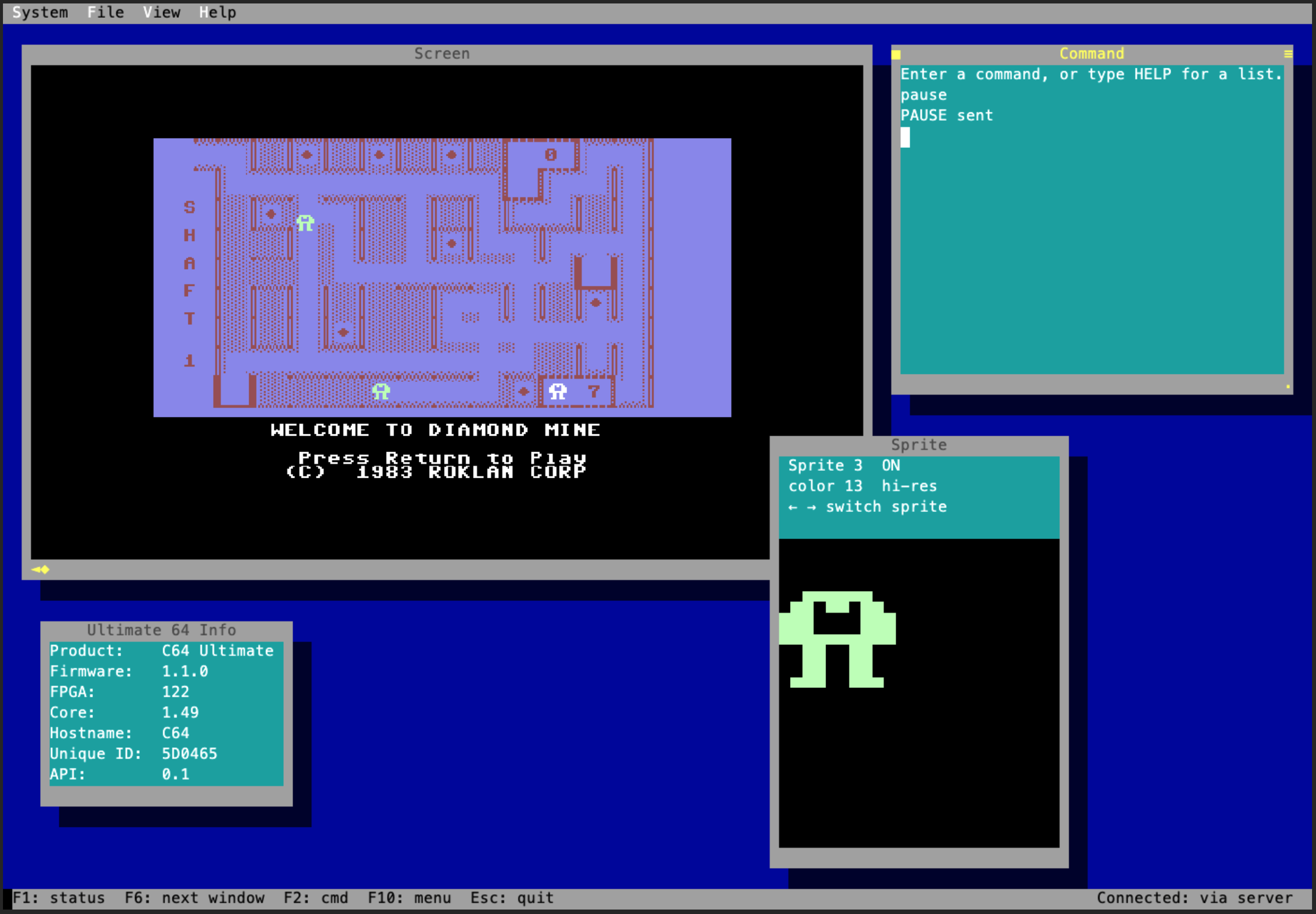
Right now u64shell can send commands, show the C64 text screen, mirror the
screen display, and inspect active sprites. It is still early, but it already
gives me a more comfortable way to control the machine than a pile of one-off
commands.
The larger idea is to make the Commodore easier to explore from modern tools without turning it into something unrecognizable. The C64 is still the thing I am interacting with. The newer pieces just make it easier to ask questions, try programs, inspect memory, and learn from what the machine is actually doing.
That is the part I keep coming back to. This is not just a way to make Claude write retro code. It is a way to make the feedback loop around a real C64 much shorter: ask a question, generate a small program, run it, inspect memory, and learn something from the result.
That feels like the right kind of modern twist on a machine that taught a lot of us how computers work in the first place.